Overview
This method returns a list of daily metrics by product.
| Method | URI |
|---|---|
GET |
https://api.shopstylecollective.com/api/v3/partners/YOUR_API_KEY/reports/clicks?start=2023-02-14&end=2023-02-14&pid=YOUR_API_KEY |
PARAMETERS
| NAME | TYPE | DATA TYPE | DESCRIPTION |
|---|---|---|---|
| start | required | date | The start date for the reports generated, e.g. 2023-02-14 |
| end | required | date | The end date (inclusive) for the reports generated, e.g. 2023-02-14 |
| includeTrafficSource | optional | boolean | Include traffic source that drove the click (Default: false) |
| includeUserAccount | optional | boolean | Include the id of the user whose content drove the click (Default: false) |
| includePartnerData | optional | boolean | Include partner data (Default: false) |
| includedFields | optional | string | Which fields to include in the report. (Default: clickDate, link, retailerName, productId, productName, brandName, categoryName, orders, clicks, shortLink, contentType, contentId, and earningsAmount) |
| toolType | optional | string | Filter by a single tool type. (textlink, productwidget, lookwidget, look, or embeddedlook) |
| async | optional | boolean | Generate the report asynchronously. A url will be provided to check the status of the report. (Default: false) |
Date values should be formatted according to ISO 8601.
Responses
| HTTP CODE | CONTENT TYPE | RESPONSE |
|---|---|---|
200 |
application/json text/csv |
A list of daily metrics by product or url to check results if async enabled. |
400 |
application/json |
{"errorCode":400,"errorName":"Invalid Date Range","errorMessage":"startDate cannot be after endDate","detailedErrors":[],"errorId":"FY38OX","headers":{}} |
API AUTHENTICATION
This API requires an authentication header to secure the data returned. The authentication header is made of two components: the authorization token and authorization date.
- From ShopStyle Support, request a secret key that will be used to generate the authorization token.
- Identify your numeric user id. Your numeric user id can be found in your API Key. This is a string that is assigned to the caller. You can find your API Key on the Account Settings page. The API key is in the format uidXXXX-XXXXXXXX-XX. The center numeric portion between the dashes is your numeric user id. For example, if your API Key is uid1234-56789012-34, then 56789012 will be your numeric user id.
-
Generate a timestamp in the format "EEE, dd MMM yyyy HH:mm:ss z" (RFC 1123) and GMT timezone using the current time. Example:
Wed, 28 Apr 2010 08:30:10 GMT -
Add the timestamp to the request header
Authorization-Date: EEE, dd MMM yyyy HH:mm:ss z -
Create a SHA1 hash of your Secret Key, API Key, Numeric User ID, and the Timestamp to generate the authorization token. Base64 encode the resulting hash.
- Concatenate your numeric user id with the authorization token using a ':' and add it to the request header
Authorization: SHPST 56789012:<token>POSTMAN COLLECTION
For convenience, we have a postman collection available for download.
OS X
- Download the Postman Collection

- Double-click
ShopStyle.postman_collection.json.zipto extract.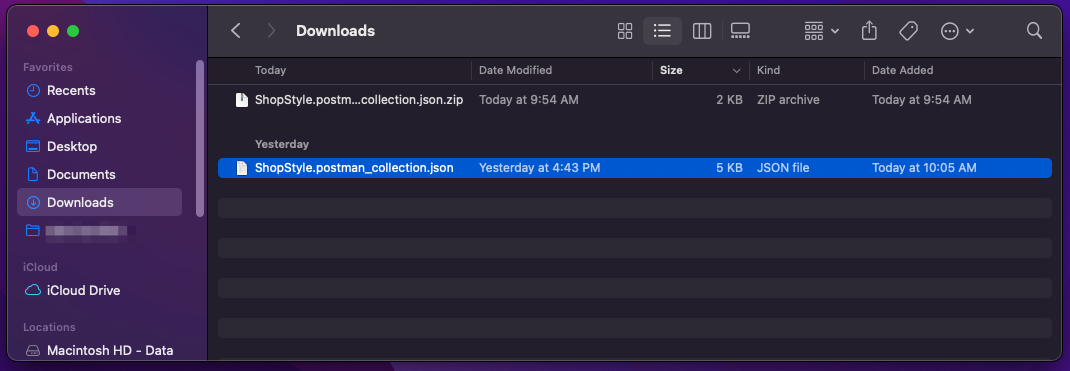
- Open Postman and click the Import button.

- Click Choose Files

- Select the
ShopStyle.postman_collection.jsonfile you extracted and click Open
- Ensure the ShopStyle collection is selected and click Import.
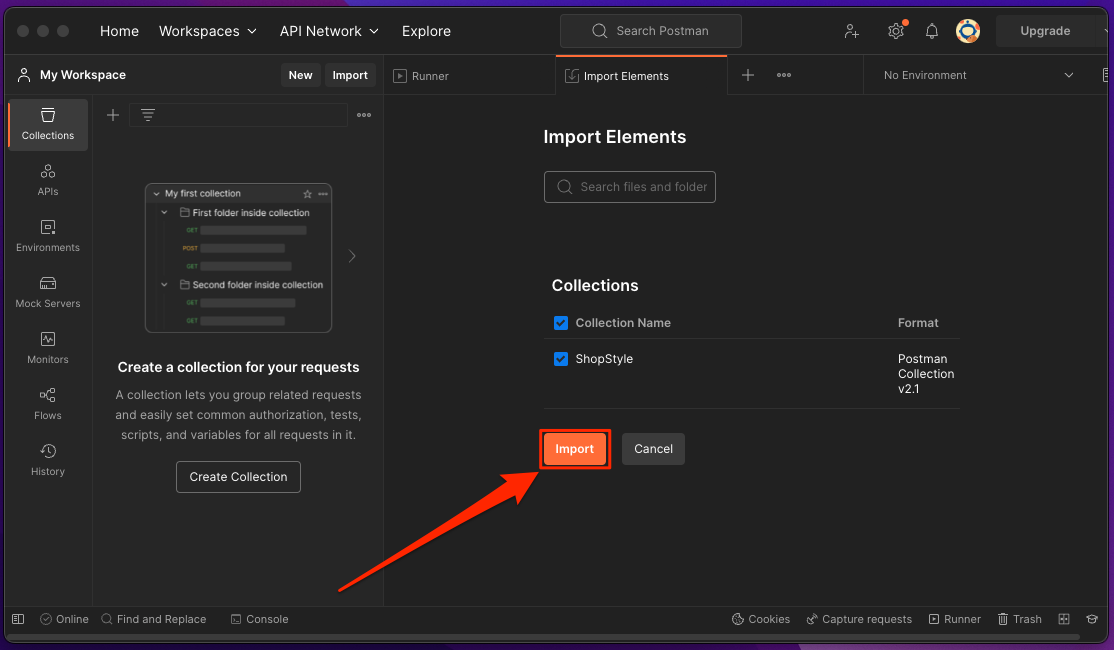
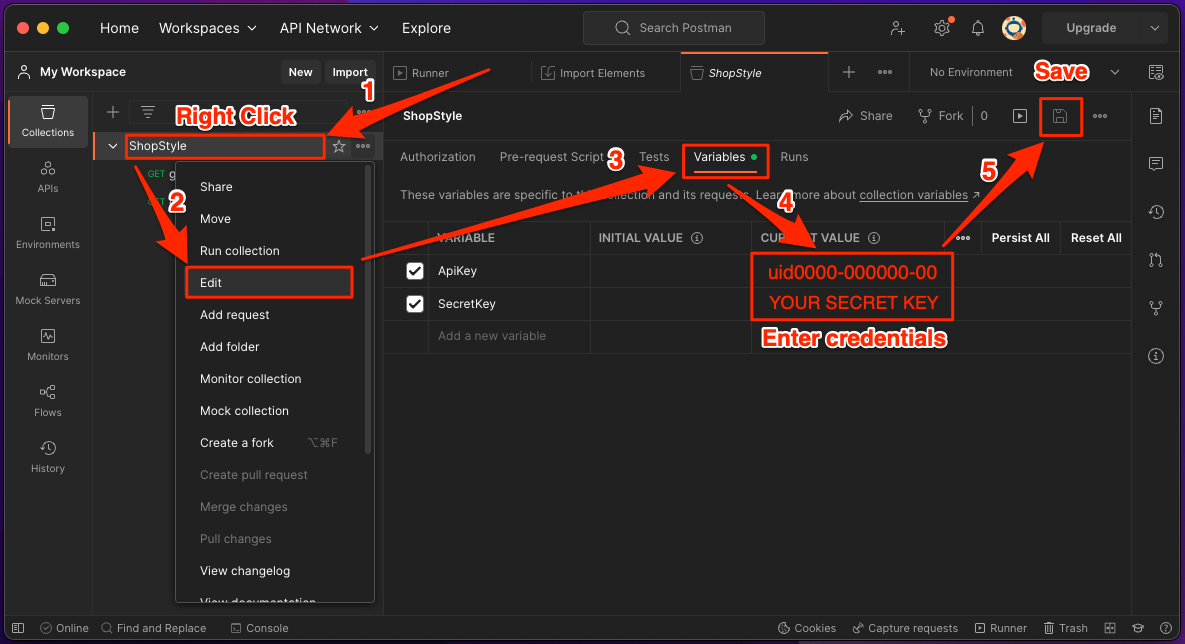
- Edit the collection and enter your credentials
- Right click on the collection.
- Click edit
- Click on the variables tab. Enter your api key and secret in the CURRENT VALUE column.
- Click Save
- You're ready to start making API requests using Postman!
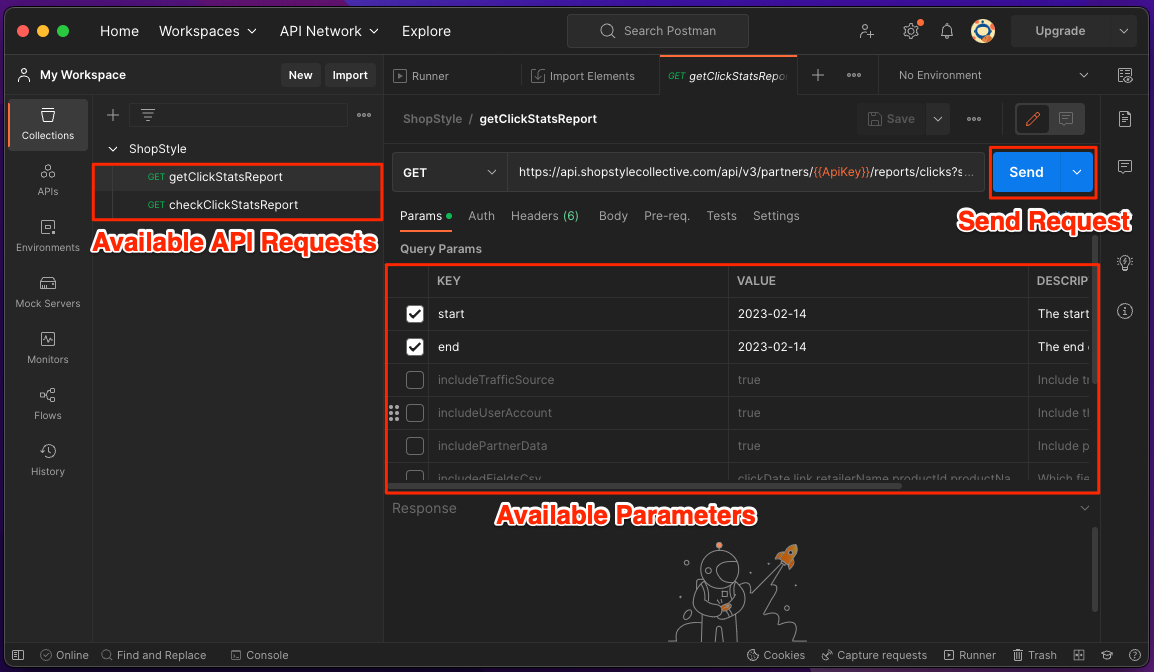
- Double-click
EXAMPLE MANUAL API REQUEST
- Start with the base url of the request.
https://api.shopstylecollective.com/api/v3/partners/YOUR_API_KEY/reports/clicks - Add your API KEY to the request. A unique API_KEY string that is assigned to the caller. You can find your API Key on the Account Settings page. Replace 'YOUR_API_KEY' with the actual value found on that page. Also, append it to the url with
?pid=YOUR_API_KEY.https://api.shopstylecollective.com/api/v3/partners/uidXXXX-XXXXXXXX-XX/reports/clicks?pid=uidXXXX-XXXXXXXX-XX - Add a start date and end date range. The date range format is YYYY-MM-DD. Append the values to the url with
&start=YYYY-MM-DDand&end=YYYY-MM-DD. The end date must be on or after the start date.https://api.shopstylecollective.com/api/v3/partners/uidXXXX-XXXXXXXX-XX/reports/clicks?pid=uidXXXX-XXXXXXXX-XX&start=2018-04-01&end=2018-05-01
SAMPLE JSON RESPONSE
[
    {
        "clickDate":"2023-02-14",
        "link":"https://www.ae.com/us/en/p/aerie/bottoms/shorts/aerie-daydream-denim-short/0706_7963_401",
        "retailerName":"aerie",
        "productId":956963611,
        "productName":"Aerie Daydream Denim Short",
        "brandName":"aerie",
        "categoryName":"women shorts",
        "earningsAmount":179.4700,
        "orders":34,
        "clicks":3247,
        "shortLink":null,
        "contentType":"Text Link",
        "contentId":null
    },
    {
        "clickDate":"2023-02-14",
        "link":"https://surprise.katespade.com/products/staci-large-slim-bifold-wallet/WLR00145-001.html",
        "retailerName":"Kate Spade Surprise Sale",
        "productId":852197572,
        "productName":"Kate Spade Staci Large Slim Bifold Wallet",
        "brandName":"Kate Spade",
        "categoryName":"women accessories wallets",
        "earningsAmount":94.3400,
        "orders":6,
        "clicks":1009,
        "shortLink":"shopstyle.it/l/bwVMs",
        "contentType":"Text Link",
        "contentId":"shopstyle.it/l/bwVMs"
    }
]
Asynchronous requests
The async=true parameter allows you to submit a request for a report and check back on it later.
- Follow all the steps to building a report request from the EXAMPLE API REQUEST except we'll add
async=trueas a parameter.https://api.shopstylecollective.com/api/v3/partners/uidXXXX-XXXXXXXX-XX/reports/clicks?pid=uidXXXX-XXXXXXXX-XX&start=2018-04-01&end=2018-05-01&async=true - Submit the request with authorization and the response should look like this instead where YYYYYYYY-YYYY-YYYY-YYYY-YYYYYYYYYYYY is the id of your report.
{"url":"https://api.shopstylecollective.com/api/v3/partners/uidXXXX-XXXXXXXX-XXXXXXXX-XX/reports/clicks/YYYYYYYY-YYYY-YYYY-YYYY-YYYYYYYYYYYY?pid=uidXXXX-XXXXXXXX-XX"}
Request
https://api.shopstylecollective.com/api/v3/partners/uidXXXX-XXXXXXXX-XXXXXXXX-XX/reports/clicks/YYYYYYYY-YYYY-YYYY-YYYY-YYYYYYYYYYYY?pid=uidXXXX-XXXXXXXX-XX
Response
[
    {
        "clickDate":"2023-02-14",
        "link":"https://www.ae.com/us/en/p/aerie/bottoms/shorts/aerie-daydream-denim-short/0706_7963_401",
        "retailerName":"aerie",
        "productId":956963611,
        "productName":"Aerie Daydream Denim Short",
        "brandName":"aerie",
        "categoryName":"women shorts",
        "earningsAmount":179.4700,
        "orders":34,
        "clicks":3247,
        "shortLink":null,
        "contentType":"Text Link",
        "contentId":null
    },
    {
        "clickDate":"2023-02-14",
        "link":"https://surprise.katespade.com/products/staci-large-slim-bifold-wallet/WLR00145-001.html",
        "retailerName":"Kate Spade Surprise Sale",
        "productId":852197572,
        "productName":"Kate Spade Staci Large Slim Bifold Wallet",
        "brandName":"Kate Spade",
        "categoryName":"women accessories wallets",
        "earningsAmount":94.3400,
        "orders":6,
        "clicks":1009,
        "shortLink":"shopstyle.it/l/bwVMs",
        "contentType":"Text Link",
        "contentId":"shopstyle.it/l/bwVMs"
    }
]